What is SimTurbo used for?
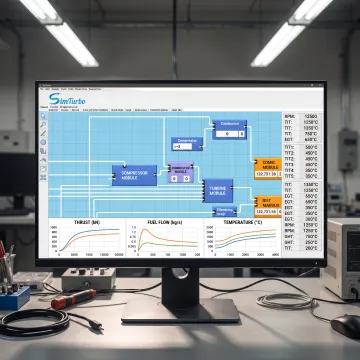
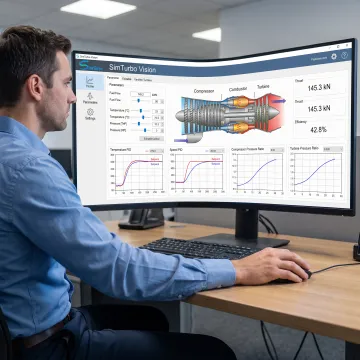
SimTurbo is used to design, simulate, analyze, and validate gas turbine engine systems. It supports engine architecture development, thermodynamic cycle analysis, steady-state and transient performance studies, and control-system design. Engineering teams can model components such as compressors, combustors, turbines, nozzles, shafts, recuperators, and afterburners, then review interactive diagrams and performance data to guide design decisions.
Can SimTurbo model both steady-state and transient gas turbine operation?
Yes. SimTurbo supports steady-state analysis for cycle efficiency, thrust or power, fuel consumption, component matching, and off-design performance. It also supports transient simulation for startup, shutdown, throttle changes, acceleration, deceleration, load changes, actuator dynamics, sensor response, and fault conditions. This combination lets users compare overall operating-point performance with the dynamic behavior that occurs during changing conditions.
Which gas turbine configurations can SimTurbo simulate?
The platform supports turbojet and related gas turbine configurations, including single-spool and dual-spool turbojets. Users can create component-based architectures and investigate advanced cycle features such as recuperation, regeneration, reheat, intercooling, and afterburning. The software is intended for aerospace, marine propulsion, industrial, power-generation, research, and educational applications where engine configuration and performance need to be examined.
Does SimTurbo support gas turbine control-system design?
Yes. SimTurbo includes capabilities for developing and evaluating gas turbine controls, including PID controllers, fuel scheduling, start and shutdown logic, gain scheduling, actuator and sensor models, protection systems, and FADEC-oriented logic. Closed-loop simulation helps users assess stability, limits, and transient response before moving toward hardware testing, virtual prototyping, or potential hardware-in-the-loop implementation.
Can I export SimTurbo simulation results for further analysis?
Yes. SimTurbo can export simulation data for post-processing in tools such as Excel, MATLAB/Simulink, and Python. This allows engineering teams and students to create custom plots, compare cases, document findings, perform additional calculations, or integrate simulation outputs into broader workflows. Interactive graphs and diagrams within the platform also provide immediate visibility into model behavior while a simulation is running.
Is SimTurbo appropriate for universities and engineering students?
Yes. SimTurbo offers academic simulation solutions for university classes, laboratories, research groups, propulsion courses, thermodynamics instruction, capstone projects, and engineering workshops. The platform supports simulation-based learning with industry-oriented gas turbine models. Discounted student licenses, classroom options, laboratory licenses, research licenses, and customized university programs are available to help institutions align access with their teaching and research needs.
Is there a free trial or demonstration available?
A 30-day free trial with full product features is available for gas turbine control-system design capabilities. SimTurbo also offers a free, 30-minute single-spool turbojet simulation demonstration by appointment through its online booking calendar. A demonstration is a useful way to review the graphical workflow, discuss a target application, and determine which licensing or academic option fits your engineering requirements.
How accurate are SimTurbo gas turbine simulations?
SimTurbo reports validation against NASA Lewis Research Center J85-GE-21 engine test data, with reported accuracy within plus or minus 2 percent. Results should still be interpreted in the context of model inputs, component data, assumptions, and the intended operating range. For design work, users should verify critical outputs against applicable test data, requirements, and their organization’s engineering validation process.