What is engine simulation software used for?
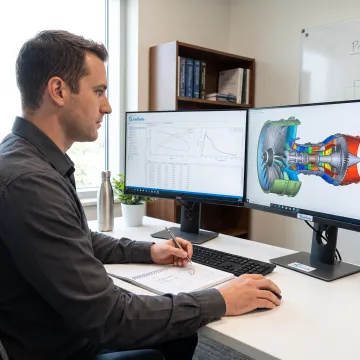
Engine simulation software creates a digital model of an engine so users can evaluate performance before building or modifying hardware. For gas turbines, it can calculate thrust or power, fuel consumption, temperatures, pressures, component matching, and operating limits. It also supports design comparisons, off-design studies, troubleshooting, control development, research, and classroom demonstrations.
Can SimTurbo model both steady-state and transient engine performance?
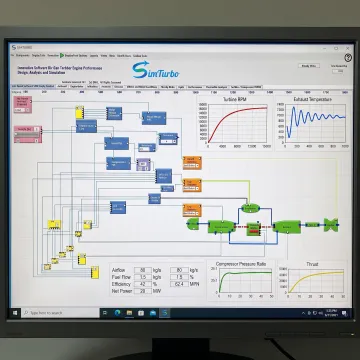
Yes. SimTurbo supports steady-state cycle and performance analysis as well as transient operation modeling. Users can study startup, shutdown, throttle changes, acceleration, deceleration, load changes, actuator behavior, sensor response, and fault scenarios. This combination lets teams evaluate both the operating-point performance of a gas turbine and its dynamic response over time.
What gas turbine components can be modeled in SimTurbo?
SimTurbo uses a component-based approach that can represent inlets, compressors, combustors, turbines, nozzles, shafts, recuperators, and afterburners. Users connect these elements into engine architectures and adjust their parameters to study system behavior. This approach supports turbojet and related gas turbine configurations while keeping the model structure visible and understandable.
Does the software support gas turbine control-system design?
Yes. SimTurbo includes control-oriented capabilities for developing and validating PID control, fuel scheduling, gain scheduling, engine protection, actuator and sensor models, and FADEC-related logic. Engineers can test closed-loop behavior against transient events, examine stability and response characteristics, and refine control strategies in a simulated environment before hardware implementation.
Can I export simulation data for further analysis?
Yes. SimTurbo supports data export for post-processing in tools such as Excel, MATLAB/Simulink, and Python. This enables teams to create custom plots, compare cases, apply additional calculations, document results, or integrate simulation outputs into broader engineering workflows. Exportable data is especially useful for research, validation reporting, and student projects.
Is SimTurbo suitable for university courses and laboratories?
Yes. SimTurbo offers academic solutions for engineering courses, laboratories, capstone projects, faculty research, and student training. Its graphical modeling environment can help learners connect thermodynamic principles with visible engine components and real-time results. University class, lab, and discounted student licensing options are available for eligible academic users.
How can I evaluate SimTurbo before purchasing?
SimTurbo offers a free 30-day trial with full product features for users evaluating gas turbine control-system design capabilities. A free 30-minute online demonstration of single-spool turbojet simulation is also available by appointment via Zoom. These options let prospective users review the interface, modeling workflow, and relevant analysis functions before selecting a license.
What licensing options are available for SimTurbo?
SimTurbo offers monthly single-seat licensing, one-year access for steady-state performance and cycle analysis, and a lifetime-access option for transient system operation simulation. Academic users can request discounted student, classroom, laboratory, research, and campus licensing. License terms include free upgrades for the stated subscription or access period, depending on the selected offering.