What can power plant design and modeling software simulate?
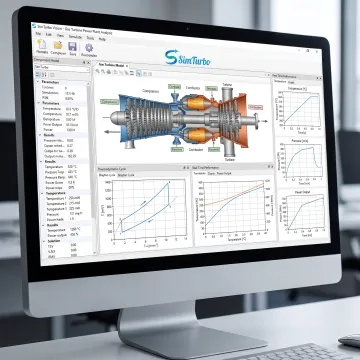
Power plant-oriented gas turbine software can simulate the thermodynamic cycle and major components, including inlets, compressors, combustors, turbines, shafts, recuperators, and nozzles. SimTurbo supports performance calculations such as efficiency, fuel use, pressure ratios, power prediction, and operating points. It also supports off-design and ambient-condition studies, allowing engineers to compare configurations before physical testing or deployment.
Can SimTurbo model both steady-state and transient operation?
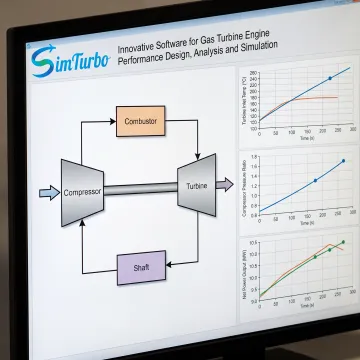
Yes. SimTurbo supports steady-state analysis for cycle performance, component matching, fuel consumption, and operating-envelope studies, as well as transient simulation for startup, shutdown, load changes, acceleration, deceleration, and fault conditions. This combination helps users assess both the expected operating point and the dynamic behavior that occurs as a gas turbine responds to changing commands or system conditions.
How does component-based modeling help engineering teams?
Component-based modeling lets teams build a system from visible elements such as compressors, combustors, turbines, shafts, controllers, and limiters instead of relying on an opaque model. Users can inspect architecture choices, revise parameters, and understand how a change affects the wider cycle. That transparency supports clearer design reviews, faster troubleshooting, and more defensible engineering decisions.
Can the software support gas turbine control-system design?
SimTurbo supports control-system development and validation with PID controllers, fuel scheduling, engine start and shutdown logic, gain scheduling, actuator and sensor models, limiters, and protection functions. Engineers can evaluate closed-loop response, system stability, transient behavior, and fault scenarios. These capabilities are useful when validating control laws before progressing to more extensive integration or hardware-in-the-loop work.
Which advanced gas turbine cycles can be evaluated?
The platform can be used to study recuperated, regenerated, reheated, intercooled, and afterburning gas turbine configurations. These options enable engineers to investigate thermal-efficiency changes, waste-heat recovery, fuel-use implications, emissions-related studies, and high-performance concepts. Comparing cycle alternatives in simulation helps identify promising configurations and parameter ranges before committing resources to detailed development or testing.
Can simulation data be exported for further analysis?
Yes. SimTurbo supports exporting simulation data for post-processing in tools such as Excel, MATLAB/Simulink, and Python. Teams can use exported results to create reports, perform additional calculations, compare cases, build custom visualizations, or connect simulation outputs with established analysis workflows. This makes the platform useful alongside—not in place of—existing engineering software and documentation practices.
Is SimTurbo suitable for university classes and research labs?
Yes. SimTurbo supports classroom demonstrations, laboratory experiments, propulsion and thermodynamics courses, capstone projects, faculty research, and engineering workshops. University class and lab programs, along with discounted student and academic licensing options, are available. The graphical, component-based environment helps learners connect cycle theory and control concepts to observable model behavior and simulation results.
Is a trial available before purchasing a license?
A free 30-day trial is available for the gas turbine control-system design offering and includes full product features during the trial period. SimTurbo also offers a free 30-minute online demonstration for single-spool turbojet simulation by appointment. Available subscription, annual, lifetime, student, and university licensing options vary by product and use case.