What is aerospace simulation software used for?
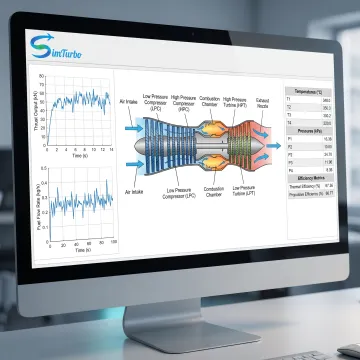
Aerospace simulation software lets engineers model propulsion systems before physical testing. With SimTurbo, users can configure gas turbine architectures, calculate thrust, power, fuel consumption, and component operating points, then study steady-state and transient behavior. It also supports control-system development, performance comparisons, and data export for post-processing in tools such as Excel, MATLAB/Simulink, or Python.
Can SimTurbo model turbojet engines?
Yes. SimTurbo supports single-spool and dual-spool turbojet modeling for propulsion analysis, education, and research. Users can represent compressors, combustors, turbines, nozzles, shafts, and related controls, then evaluate thrust, fuel consumption, spool interaction, component matching, and off-design operating conditions. The component-based approach makes it easier to inspect how configuration changes affect overall engine behavior.
Does the software support transient gas turbine simulation?
Yes. Transient simulation can examine startup, shutdown, throttle movements, acceleration, deceleration, load changes, actuator dynamics, sensor response, environmental variation, and fault scenarios. This capability helps users understand dynamic response rather than relying solely on steady-state points. It is particularly useful when evaluating engine stability, response optimization, protection logic, and the interaction between a plant model and its controller.
Can I design and test gas turbine control systems?
SimTurbo supports control-system design and validation for gas turbine applications. Users can develop PID controllers, fuel schedules, start and shutdown logic, gain scheduling, actuator and sensor models, limiters, protection systems, and FADEC concepts. Closed-loop simulation enables teams to test control behavior against dynamic engine conditions and refine response before moving toward real-time or hardware-in-the-loop workflows.
What advanced gas turbine cycles can SimTurbo evaluate?
SimTurbo can be used to investigate recuperated, regenerated, intercooled, reheated, and afterburning cycle configurations. These studies can help engineers compare thermal efficiency, fuel use, waste-heat recovery, component requirements, emissions-related considerations, and high-performance operating goals. The platform is suited to exploring alternative architecture concepts alongside more conventional turbojet and gas turbine system configurations.
Is SimTurbo suitable for universities and engineering students?
Yes. SimTurbo offers university class and laboratory program options, as well as discounted licensing for students and academic users. The software supports demonstrations, propulsion and thermodynamics coursework, lab experiments, capstone projects, faculty research, and graduate studies. Its graphical, component-based environment helps learners connect engine architecture with cycle performance, transient effects, and control-system behavior.
How can I try SimTurbo before purchasing?
SimTurbo offers a free 30-day trial for its gas turbine control-system design capability with full product features during the trial period. A free, 30-minute online Zoom demonstration is also available by appointment for single-spool turbojet simulation. These options allow prospective users to review the interface, ask technical questions, and assess how the platform aligns with their analysis or teaching requirements.
Can simulation results be exported for other engineering tools?
Yes. SimTurbo supports data export for post-processing in Excel, MATLAB/Simulink, and Python. This enables users to extend analysis, create custom plots, compare cases, integrate results into existing engineering workflows, or document findings for design reviews and research. Export capability is valuable when simulation is one part of a broader propulsion, controls, or academic analysis process.